

Free GST Invoice Software: What Happens to the Data After an Invoice Is Created?
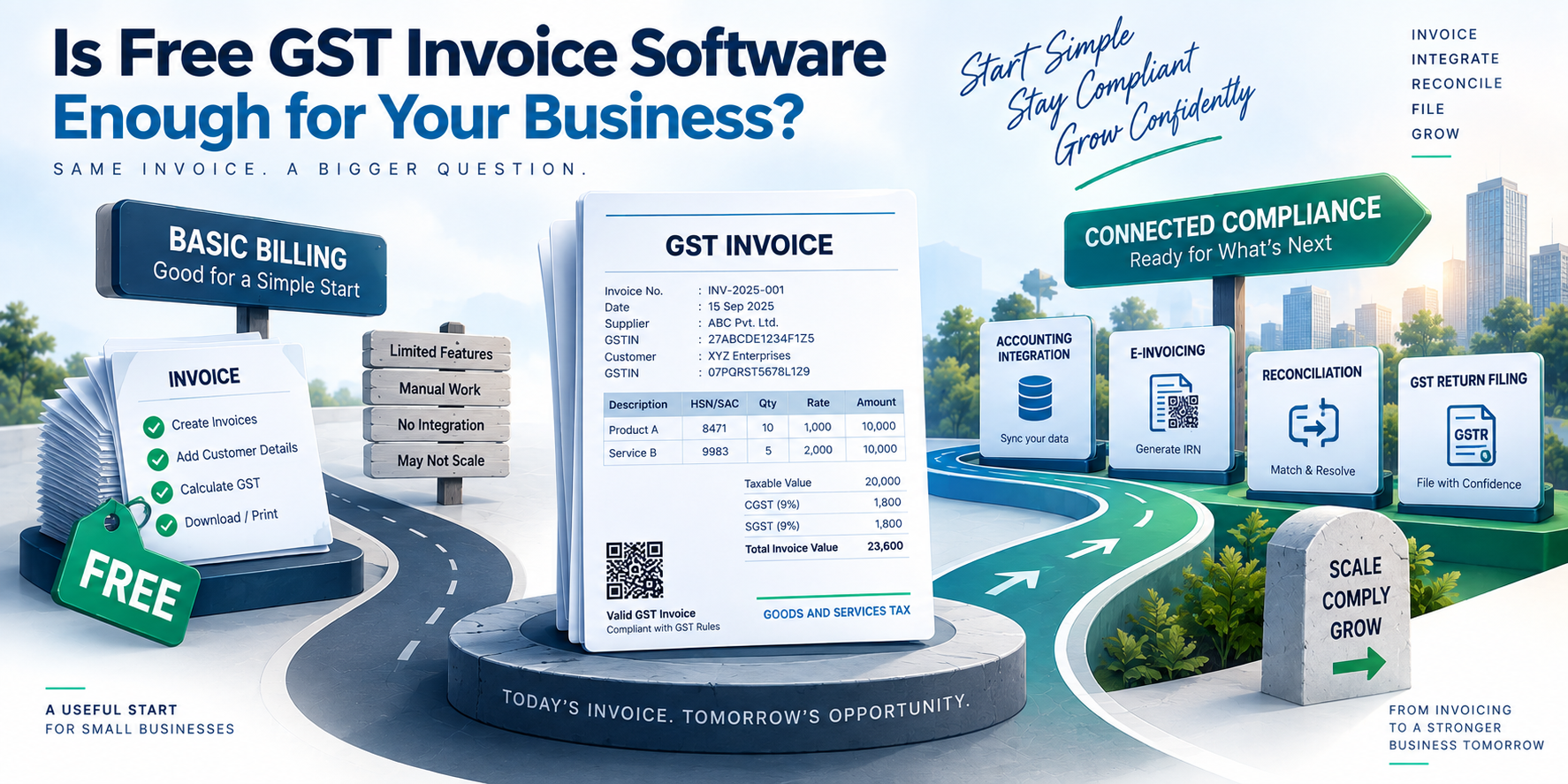
Creating a GST invoice is only the first step in a much larger data flow. Once an invoice is generated, its information may need to move through e-invoicing systems, accounting software, ERP workflows and eventually GST return reporting. This makes free GST invoice software an interesting technical problem, because the value of the tool is not limited to producing a PDF or printable invoice.
For developers and finance-technology teams, the more important question is what happens to the structured invoice data after creation. How is it validated? How does it reach another system? What happens when an invoice is changed? And how can businesses avoid maintaining the same information in several places?
An invoice is more than a document
A GST invoice contains structured business information such as supplier and recipient details, invoice number, invoice date, taxable value, tax amounts, item information and place of supply.
From a software perspective, these fields form a data object rather than simply a document.
A basic invoice workflow might look like this:
Transaction → Invoice Data → Validation → Accounting/ERP → E-Invoice where applicable → GST Reporting
The important part is that each stage should preserve the relationship between the original transaction and the information eventually reported to the tax system.
The GST Portal's documentation confirms that GSTR-1 contains invoice-level information for several categories of outward supplies, along with credit and debit notes, exports, amendments and other reporting information.
That means a billing system should be designed with downstream reporting in mind.
Where free GST invoice software can become technically limited
A basic invoicing application can generate invoices successfully while still creating problems later.
For example, imagine a business creates 2,000 invoices during a tax period. If those invoices remain trapped in a standalone billing application, the finance team may eventually need to export the data, clean it, map fields and upload it into another system.
The invoice itself may be correct, but the data pipeline becomes inefficient.
Some common problems include:
inconsistent customer GSTIN formats
incorrect invoice numbering
missing HSN or SAC information
mismatched tax calculations
duplicate records
inconsistent dates or document types
manual spreadsheet transfers
different versions of the same invoice data across systems
This is where the difference between an invoice generator and an integrated billing system becomes important.
Validation should happen before the data moves
Good invoice software should not wait until return preparation to discover basic data problems.
Validation can happen at several levels.
Field validation
The application can check whether mandatory fields are present and whether values follow the expected format.
For example, invoice numbers can be checked for length and allowed characters. The GST Portal's GSTR-1 documentation states that invoice numbers can be up to 16 characters and use alphanumeric characters along with permitted dash and slash characters.
Business-rule validation
The software can also check relationships between fields.
For example:
taxable value and tax amount should correspond
supply type should align with the transaction
place of supply should be captured correctly
customer GSTIN should be associated with the correct recipient
credit notes should remain linked to their original documents where applicable
These checks reduce the amount of correction required later.
Duplicate detection
Duplicate invoice records can create reconciliation problems. A system can use combinations such as supplier identifier, financial year, invoice number and document type to identify potentially duplicated records before they move further into the workflow.
The exact implementation will depend on the accounting or ERP architecture, but the principle is simple: validate once, reuse the trusted data instead of repeatedly correcting it.
The e-invoice connection changes the workflow
For businesses covered by the applicable e-invoicing requirements, the workflow goes beyond generating an invoice locally.
The GST system documentation explains that invoice details are uploaded to the Invoice Registration Portal, which generates an Invoice Reference Number (IRN) and QR code. The resulting e-invoice information can then be auto-populated into relevant sections of GSTR-1.
This creates an important architectural consideration.
The billing application should not treat the PDF as the primary source of truth. The structured invoice data should remain available for transmission, reconciliation and reporting.
A simplified architecture could look like:
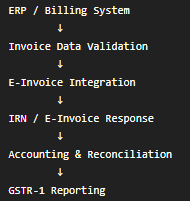
The exact implementation varies between systems, but separating these stages makes the workflow easier to monitor.
Why APIs matter in invoice systems
Manual export and import can work for a small number of transactions. As transaction volume increases, APIs become more useful.
An API-based workflow allows one application to send structured invoice information to another system without requiring a person to repeatedly download and upload spreadsheets.
A typical integration might pass fields such as:
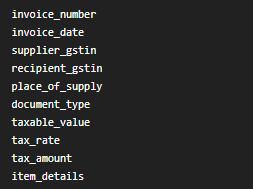
The receiving system can then return information such as processing status, identifiers or validation errors.
From a development perspective, error handling is just as important as successful requests.
A production system should be able to distinguish between:
Accepted → Processed → Rejected → Requires Correction → Retried
Without these states, users may not know whether an invoice actually completed the intended workflow.
Reconciliation is where the real value appears
Suppose the billing system shows 5,000 invoices, while the accounting system contains 4,997 records.
The difference may come from a failed integration, duplicate prevention, manual deletion or an incorrectly mapped document.
Without reconciliation, the discrepancy can remain hidden until someone compares reports manually.
A better approach is to maintain identifiers across systems.
For example:
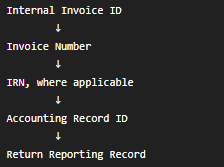
These identifiers create an audit trail.
When someone investigates an invoice months later, they can trace where the original record came from, what happened to it and which downstream systems received it.
What to look for in free GST invoice software
The word "free" describes pricing, not necessarily technical capability.
Before selecting an invoice application, it is useful to check how it handles the complete data lifecycle.
Look for answers to questions such as:
Can invoice data be exported in a structured format?
Can the software connect with accounting or ERP systems?
Does it support relevant e-invoice workflows?
How are validation errors displayed?
Can users identify failed transactions?
Is there an audit history for changes?
Can invoice data be reconciled with downstream records?
What happens when transaction volume increases?
These questions are more useful than simply asking whether the software can create an invoice.
For businesses evaluating integrated GST workflows, platforms such as Webtel's ERP-integrated GST filing solution illustrate the broader approach of connecting invoice and compliance workflows rather than treating billing as an isolated activity.
The important distinction is data continuity
A GST invoice starts as a business transaction, but it can become part of several connected processes.
If every system maintains a separate copy of the information, reconciliation becomes harder. If the same structured data can move through the workflow with appropriate validation and identifiers, the process becomes easier to trace.
This is also why invoice software should be evaluated as part of the wider technology stack rather than as an isolated document-generation tool.
The GST Portal itself supports multiple methods for preparing GSTR-1, including online entry, offline data upload and third-party applications through GST Suvidha Providers.
For developers, the practical lesson is straightforward: the invoice should be treated as structured transactional data first and a document second.
That approach makes integrations easier to design, errors easier to locate and compliance data easier to reconcile.